
 RowCraft – Table Fields for Jira
Using the app
RowCraft table change history
Every saved change to a RowCraft table is listed in the Table changes tab of the work item: who saved it, when, which rows were added or deleted, and which cells changed from what to what.
Open the change history
- Open a work item.
- Under Activity, select the Table changes tab.
The newest changes come first. Select Show older changes at the end of the list to load more, and the refresh button to reload. The list also refreshes by itself after you save a table field on the work item.
Read an entry
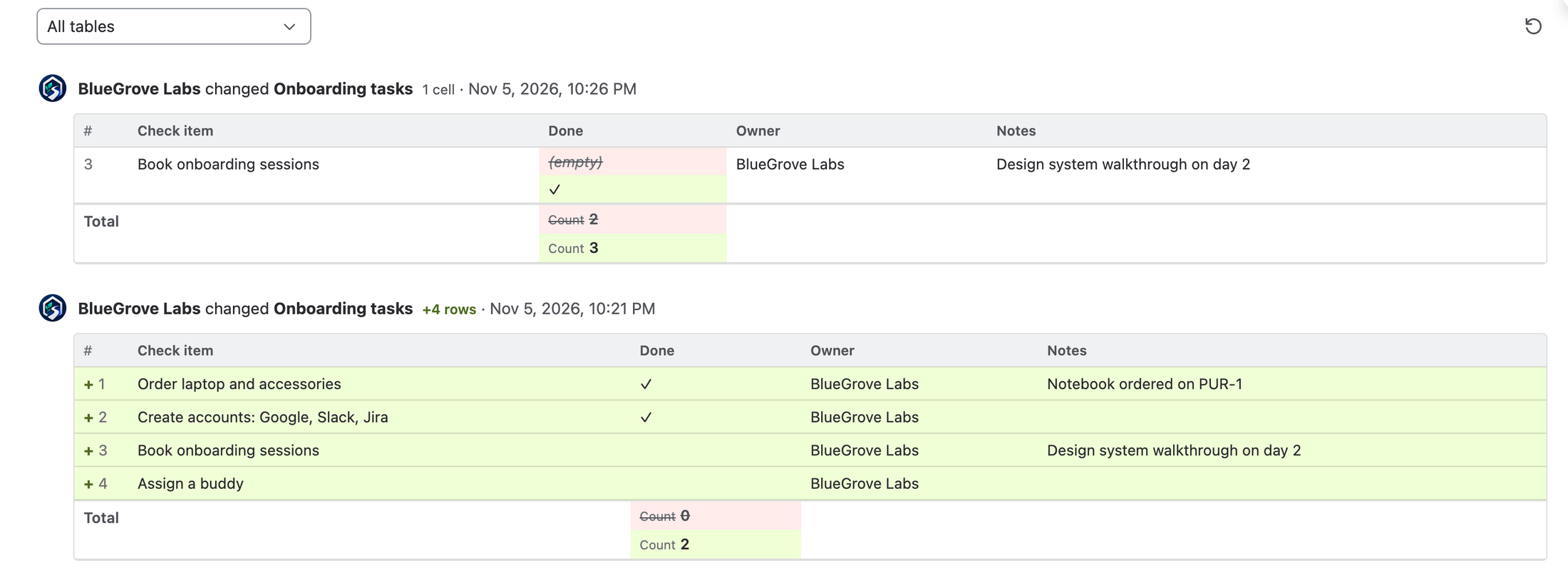
Each entry starts with a line such as BlueGrove Labs changed Onboarding tasks · Nov 5, 2026, 10:26 PM, with badges for what changed: +4 rows, −1 row, 2 cells.
Below it, a small table shows only the rows that changed, with the table's current columns:
| Change | How it is shown |
|---|---|
| Row added | Green row marked + |
| Row deleted | Red, struck-through row marked − |
| Cell changed | The old value struck through on red, the new value on green |
| Formula result changed with it | Old and new value, like a changed cell (not counted as a change of its own) |
| Totals changed | A Total row at the bottom with the old and new totals under each column |
| Rows reordered | A Rows reordered note |
Unchanged cells of a changed row are shown as usual, so you can recognise the row. Numbers use the column's format, options their colours and people their names; empty cells show (empty). Long texts are cut to three lines (hover to read them), and when a save changed more than 10 rows, the first 10 are shown with Show N more rows.

When a work item has several tables, choose one in Show changes of to see only its changes.
Where the history comes from
| Table | Source | Since when |
|---|---|---|
| Table field | Jira's own change history of the field, which stores the full table before and after each save | Every change since the field was created, including changes made before RowCraft's history tab existed, through any route: the editor, bulk edit, REST, automation and imports |
| Panel table | RowCraft records each save in the panel | From the RowCraft version that started recording panel tables |
- The author and time come from Jira (table fields) or from the save (panel tables) and cannot be changed.
- Each save is one entry; saves are not merged.
- Columns that were deleted later appear as Deleted column. Background clean-ups after a column was deleted are not shown as changes.
- You only see the history of work items you can browse.